Hotel Photography Shot List: Planning a San Antonio Property Shoot
A useful hotel photography shot list starts with the guest journey, not with a camera. Before a San Antonio property shoot, identify every room category, guest-facing facility, operational constraint, and delivery channel the images must support. The result should be a truthful image library for the booking website, online travel agencies (OTAs), sales materials, social channels, and internal marketing.
Start with the property brief and booking path
Bring the photographer, hotel marketing lead, operations contact, and relevant food-and-beverage or design representatives into one planning conversation. Confirm positioning, renovation status, audiences, brand rules, access windows, and deliverables. A downtown hotel may need arrival and meeting imagery; a Hill Country property may need stronger grounds, views, and outdoor amenities. The shot list should reflect the actual property.
Map the path a guest takes when evaluating the hotel: arrival, lobby, room category, bathroom, view, amenities, dining, and nearby setting. Identify what a prospective guest needs to understand before making a reservation, rather than collecting attractive images with no clear purpose.
Build room-category accuracy into the shot list
List every sellable category by the exact name used in the property-management system and booking channels. Do not use one attractive room to represent materially different categories unless the hotel confirms that layouts and features are equivalent.
For each category, plan a consistent set: a wide layout view, second angle, bed and seating or work area, bathroom, and any decision-changing feature. Add balcony, terrace, view, kitchenette, or accessible features when available. Photograph the room as sold. If a feature is not present in every unit, label the image carefully and keep it out of a category gallery where it could confuse guests.
Shot-list section
Confirm before the shoot
Main use
Room categories
Category names, representative rooms, layouts, beds, views, accessible features
Booking-site and OTA galleries
Arrival and architecture
Entrance, facade, street context, lobby, distinctive materials
First impression and sales materials
Amenities
Pool, fitness, spa, courtyard, parking, outdoor spaces
Guest expectation-setting
Food and beverage
Restaurant, bar, breakfast, dishes, operating windows
A hotel remains an operating business during photography. Coordinate with front desk, housekeeping, engineering, culinary, and security. Reserve representative rooms without blocking excess inventory, and establish rules for occupied rooms, privacy, deliveries, noise, and public areas. One on-site coordinator should open spaces and approve temporary resets.
Schedule spaces according to light and operations. Exterior and pool images may need early morning, late afternoon, or twilight access. Restaurants are often easiest between service periods. A chef or food-and-beverage lead should know when each dish is ready, while housekeeping completes linen, glass, mirror, and floor checks. Keep styling faithful to the guest experience; camera adjustments should not make a room misleading.
Cover architecture, amenities, and food and beverage
Architectural photography should explain how the property feels and functions. Include the entrance, facade, lobby, reception, lounges, meeting rooms, and signature design details. A San Antonio brief may also call for local materials, shaded courtyards, landscape, or a Hill Country setting. Confirm whether aerial work, permissions, airspace review, or other production services are required rather than assuming they are included.
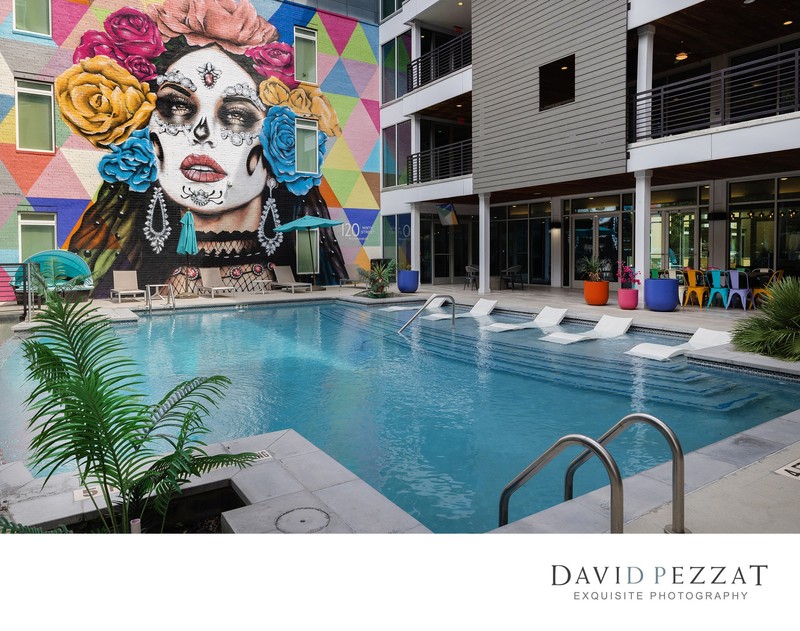
Amenities deserve context as well as details. Capture the pool or spa in relation to the property, then add cabanas, fitness equipment, outdoor seating, or other genuinely offered features. Include parking, shuttle, business-center, or accessible-route imagery where it helps explain an important guest service.
For food and beverage, plan a restaurant or bar view, a table setting, and selected dishes or drinks. Confirm menu availability, styling support, permissions, and whether images are for the hotel or a separate operator. Photograph what the property can consistently serve. If branded amenities or retail products also need standalone images, define that as a separate product photography requirement.
Prepare files for the website and OTAs
Ask where every image will be used. The booking website may need hero images, responsive crops, and room-category galleries. OTAs need clear, realistic images that let travelers compare categories and inspect facilities. Booking.com’s January 2019 photography guide recommends photographing all room types, including at least four images per room type and a bathroom image for each.1 This is historical planning guidance, not a current platform specification; verify the requirements in the property's channel account before production.
Deliver a labeled gallery map, not just a folder. Use filenames that identify property, category, space, view, and sequence. Separate hero candidates from factual category images. Confirm resolution, crops, usage rights, and that retouching preserves room dimensions and views. Operations should check that visible amenities and services remain current.
Final pre-shoot checklist
Before confirming dates, approve the room-category list, representative rooms, priority spaces, access schedule, styling responsibilities, staff contacts, privacy plan, food schedule, exterior light windows, and delivery specifications. Walk the property with the photographer when possible. Mark spaces needing staff support and note what is seasonal, under renovation, closed, or subject to brand approval.
A well-planned library shows the property attractively while helping guests understand what they will find on arrival. Explore David Pezzat Photographers’ hotel and resort photography, then contact the studio with the location, room categories, priority spaces, and intended channels. The production scope, schedule, usage, and delivery requirements should be agreed for your property.
Frequently asked questions
How many images should be on a hotel photography shot list?
There is no universal count. Start with every room category and its essential views, then add common areas, amenities, dining, and exteriors. Channel requirements and property size should determine the final number.
Should every room category be photographed separately?
Yes, when layouts, beds, bathrooms, views, or features differ. Use a representative room only when the hotel confirms that it accurately represents the category being sold.
How do we photograph an operating hotel without disrupting guests?
Use an operations contact, schedule around service periods, protect guest privacy, and define movement and access rules in advance. Build flexibility into the plan rather than promising zero disruption.
What should a hotel prepare before the photographer arrives?
Prepare spaces to the property's normal guest-ready standard. Press linens, clean reflective surfaces, remove temporary clutter, check lights, and assign staff who can open and reset spaces.
Do hotel photos need separate website and OTA versions?
They may need different crops, sequences, labels, and specifications even when they come from the same shoot. Confirm channel requirements before preparing the final selections.
Can a hotel include architecture and product photography in one project?
Discuss a combined scope when the property needs architecture, interiors, branded objects, or retail products. Confirm the schedule, lighting, styling, image usage, and deliverables in a written quote.
Ready to plan your hotel photography?
Share your property location, room categories, amenities, booking-channel needs, and preferred dates with David Pezzat Photographers to discuss your shoot.